Showing posts with label Mac. Show all posts

Friday, July 18, 2014

iCarryAlls iPad Cases

On April 3rd 2010, Apple released one of the most revolutionary pieces of technology of our time, the iPad. This device would forever change businesses, schools, and everyday individuals. Unfortunately, the iPad had a small issue, it was prone to breaking from drops and bumps. This was solved with the massive amounts of cases and covers that hit the market shortly after its release. A company named iCarryAlls has taken the concept of an iPad case to the next level with its line of innovative leather cases.

iPad Zippered Leather Padfolio With Bluetooth Keyboard
and Angle Viewing - Part number 312
Their line of next generation iPad cases have a slot for your iPad with a kickstand along with several pockets and space for a notepad. Right now they offer cases that fit the iPad Air and the iPad 1/2/3/4 generations. They also have a separate line of cases that fit the iPad Mini. Some of the higher-end ones even have space for a Bluetooth keyboard (included with the case). For the notepad space, the cases support Legal, A4, Letter, and Paper Pad. They also allow you to pick from a variety of colors. If you’re left-handed, no problem. They offer an option for that too. And for added personalization, they allow you to engrave your name or your business name on the front of the case. And the best part about all of it is it’s much more affordable than other business-oriented iPad cases out there. Most of them sell for just under $150 (USD). If you still can’t find what you want, they offer a service where you can submit a custom design and they will make it for you. All you have to do is fill out a description of the design, upload a photo or two (optional), and send it off and they will get in contact with you.

If you don’t own an iPad, no need to worry, they also have a great selection of cases for the Microsoft Surface and a wide range of Android tablets such as the Samsung Galaxy and the Nexus. They also have cases that are designed for the Kindle Fire. If you don’t own a tablet at all, they also have laptop cases for MacBooks, ChromeBooks, and a range of Lenovo laptops.


If you want to purchase a case from iCarryAlls, you can check out their website at http://www.icarryalls.com/. Or you can check out their products at Amazon along with customer reviews from customers at http://www.amazon.com/s/ref=sr_st_review-rank?keywords=xiaozhi&qid=1405474427&rh=n%3A172282%2Cn%3A541966%2Ck%3Axiaozhi%2Cp_89%3AXIAOZHI&sort=review-rank. 

So let us know in the comments, do you own an iPad? Will you be buying an iCarryAlls iPad case? Let us know in the comments below.

Hey blog readers! If you want to follow our meaningless updates, check out our pages here:
Facebook: http://on.fb.me/U9s2Ld
Twitter: Follow us @allstuffnerdy
Google+: https://www.google.com/+AllstuffnerdyBlogspot
If you have a business you would like us to mention at the beginning of a post, check out our gigs on Fiverr:
Joshua: http://fiverr.com/armmaster17
Brandon: http://fiverr.com/maltzy
Spreadshirt: http://allstuffnerdy.spreadshirt.com
Check out our SpreadShirt shop for our awesome selection of geeky apparel. We offer Mens, Womens, and kid sizes of T-shirts, Long-sleeve shirts, and hoodies in addition to coffee mugs and more. Check out our store here: http://allstuffnerdy.spreadshirt.com

Thursday, June 19, 2014

Tech Wars-Mobile OS Edition

Copyright 2014 Joshua Zenn. All logos within are property of their respective owner(s)


iOS vs Android. Their makers seem locked in an infinite battle. And now Microsoft has (re)entered the mobile arena with Windows Phone 8.1. It's time to put these mobile operating systems to the test. Now before we begin we have to explain that we are only using CONSUMER editions of the operating systems. That means that WP 8.1 Developer and iOS 8 are excluded.


iOS 7.1 Android 4.4 Windows Phone 8.1 Winner
First released June 29, 2007 October 2003 2004 Android 4.4
Fanbase 410 million (2012 900 million (2013) Unknown (less than 5% of market share) Android 4.4
Apps in app store more than 1 million 950,000 120,000 iOS 7.1
Kernel/code roots Darwin/Unix Linux Windows Kernel NA
Device support Apple branded hardware Most ARM based phones with at least 512 MB RAM Microsoft branded hardware (mostly Nokia and Samsung at the moment) Android 4.4
Screen sharing support Airplay Chromecast USB or Miracast WP 8.1
Voice Assistant Siri Google Now Cortana WP 8.1
Developer program $200 USD a year plus you must own a Mac one-time $25 USD fee plus any computer that will run Java $90 yearly fee plus any PC running Visual Studio 2013 Android 4.4
Enterprise device management Yes, certificates Unknown Yes, Microsoft Exchange Tie, iOS and WP
Emulators Yes, only on Macs with the Developer Program Yes, with devkit. And boot a fully functional version with the x86 project Yes, included with devkit Android 4.4
Developer previews Yes, requires full DevCenter subscription Yes, but only on supported devices Yes, using app with free AppStudio account WP 8.1
Built-in browser Safari Chrome Internet Explorer Three way tie, category eliminated
Unlock methods Jailbreak Root None iOS 7.1
"silent" mode Do Not Disturb Unknown Quiet Hours WP 8.1

Winners Average user Developer Buisness user Overall Winner
Windows Phone 8.1 Android 4.4 Windows Phone 8.1 Tie, Windows 8.1 and Android 4.4

So for this episode of Tech Wars, we divided up the results a little bit differently. Now can break down each section to show how we selected a winner.

Average user:
Windows Phone just barely won this catagory with it's amazing "Quiet Hours" mode that supports geofencing, calender events, and manual triggers. It also has the most flexible screen-sharing function and it has one of the best voice assistants. We chose Cortana as the best voice assistant because Cortana can intelligently display more information than Siri and Cortana is also very expandable through the Windows Phone API.

Developer:
Android took this catagory by storm by having an extremely cheap developer program and a universal devkit that works on just about any computer that is capable of running and compiling Java. It also has a decent emulator and there is an unofficial port to the x86 (32-bit) PC platform.

Business user:
As discussed above, Quiet Hours is an amazing feature of Windows Phone 8.1. And a "silent mode" is a must for any business professional. Windows Phone also has Cortana and offers the best support with enterprise profiles by integrating with your business's already-existing Microsoft Exchange services. And it also offers a nice screen-sharing feature so you can give presentations using the included Microsoft Office app.

Overall Winner:
Windows Phone 8.1 is great and all, but Android has an iron grip in the market share holding 900 million device registrations. Plus Android has lots of apps already in it's app store. But Windows Phone 8.1 is feature rich in almost every other category. So this Tech Wars ends in a tie.

So let us know in the comments, do you agree with our pick? Would you have picked something else? Do you think we left out a worthy competitor? Let us know in the comments. And stay tuned every Tuesday and Thursday for more Tech Wars.

Hey blog readers! If you want to follow our meaningless updates, check out our pages here:
Facebook: http://on.fb.me/U9s2Ld
Twitter: Follow us @allstuffnerdy
Google+: https://www.google.com/+AllstuffnerdyBlogspot
If you have a business you would like us to mention at the beginning of a post, check out our gigs on Fiverr:
Joshua: http://fiverr.com/armmaster17
Brandon: http://fiverr.com/maltzy
Spreadshirt: http://allstuffnerdy.spreadshirt.com
Check out our SpreadShirt shop for our awesome selection of geeky apparel. We offer Mens, Womens, and kid sizes of T-shirts, Long-sleeve shirts, and hoodies in addition to coffee mugs and more. Check out our store here: http://allstuffnerdy.spreadshirt.com

Sources:
http://en.wikipedia.org/wiki/History_of_iOS
http://en.wikipedia.org/wiki/IOS
http://en.wikipedia.org/wiki/Android_(operating_system)
http://en.wikipedia.org/wiki/Windows_Phone

Wednesday, June 04, 2014

Free games from EA - Origin on the house deals

By now most of us know what Valve's Steam service is. It's a gaming platform that provides a game store, mods and customization sharing platform, along with a social network complete with screenshot and screen capture sharing. Valve has refused to release actual data, but it is rumored that Valve owns the majority of the gaming market on Windows, Mac OS X, and Linux combined. Although small and unheard of, Origin is the largest competitor to Steam. Steam owns the market with an all-in-one package of a social network and game store. Plus they have insane deals going on all the time. They even have their own in-home streaming service (read more here). EA saw this as a major challenge. They needed to get attention back to Origin. But how do you beat insane deals that sometimes can shave 90% of the original price? Give away games for free. Yes, EA is giving games away for free. And it's not sweepstakes or links to piratebay. They are giving away free EA branded games to anyone who wants them. EA announced On The House Deals back in may and has been giving away 1 free game ever since. They only do one title at time. Recently some major ones include Dead Space and Plants vs. Zombies Game of the Year Edition. You have to act fast though, EA says on their website: "...On the House specials can appear and disappear at any time". EA says on the website "... [EA's on the house deals are] a fantastic way to see what Origin is all about." So obviously this is a big promotion to move people away from Steam. In my experience, I just download Origin to claim and download the game, then I add it to steam as a non-Steam game. That way people can see what I'm playing, but I can still take advantage of EA's on the house deals. You can bookmark https://www.origin.com/en-us/store/free-games/on-the-house or just check our Twitter feed (see below) to get updated when a new game comes out.

Hey blog readers! If you want to follow our meaningless updates, check out our pages here:
Facebook: http://on.fb.me/U9s2Ld
Twitter: Follow us @allstuffnerdy
Google+: https://www.google.com/+AllstuffnerdyBlogspot
If you have a business you would like us to mention at the beginning of a post, check out our gigs on Fiverr:
Joshua: http://fiverr.com/armmaster17
Brandon: http://fiverr.com/maltzy
Spreadshirt: http://allstuffnerdy.spreadshirt.com
Check out our SpreadShirt shop for our awesome selection of geeky apparel. We offer Mens, Womens, and kid sizes of T-shirts, Long-sleeve shirts, and hoodies in addition to coffee mugs and more. Check out our store here: http://allstuffnerdy.spreadshirt.com

Game Corner - Surgeon Simulator 2013 - Review/Gameplay tips

This advertising slot is open! To have a paragraph here featuring your company (doesn't have to be tech related), go to http://www.fiverr.com/armmaster17/mention-your-company-in-a-blog-post.

What's a game that combines hours of fun with gruesome depictions of medical operations? Surgeon Simulator 2013. Originally created as part of a programming contest, the game was then expanded into a full-featured game to be released on Valve's Steam game distribution store. In the game you play as Nigel, a supposed surgeon tasked with undertaking many difficult and strange operations. To begin you start with a basic heart transplant. The game is controlled with the keyboard and mouse. The mouse moves Nigel's hand, while the AWER and Space keys control his individual fingers. If you want to use two hands in the game, you are going to need to pick up a Razer Hydra. So back to the game, you use the difficult and awkward controls to move his hand around to pick up various tools. In the upper right-hand corner you can watch the blood level of the patient. You lose when the patient loses all of their blood. The patient loses blood when certain tools come in contact with the flesh of the patient. The game never mentions it until later (I had to look online to find it), but there are a set of syringes in the game that are used to control the blood flow of the patient. One of the syringes stops blood flow. However, if you accidentally stab yourself with that syringe, your vision becomes warped and it becomes difficult to perform the other operation. Hitting yourself with the other syringe will undo the effect. But beware not to mix up the syringes as the second one can make the bleeding worse. When run when the Steam service is in online mode, various achievements can be obtained by doing several difficult or gruesome tasks. As you move up in levels, the operations become more difficult and you change locations. Different types of surgeries include heart transplant, kidney transplant, and brain transplant. Locations include surgery room, ambulance, and space (which tends to be the most difficult location).

Bottom line:
Besides being quite frusturating and having limited replay value, it is definately full of easter eggs and random physics that can create hours of fun.

My rating: ***** 5 stars out of 5

If you want to get it yourself, you can grab it from the Steam client (steampowered.com) for $9.99. But if you keep an eye on it you may catch it on sale!


Hey blog readers! If you want to follow our meaningless updates, check out our pages here:
Facebook: http://on.fb.me/U9s2Ld
Twitter: Follow us @allstuffnerdy
Google+: https://www.google.com/+AllstuffnerdyBlogspot
If you have a business you would like us to mention at the beginning of a post, check out our gigs on Fiverr:
Joshua: http://fiverr.com/armmaster17
Brandon: http://fiverr.com/maltzy
Spreadshirt: http://allstuffnerdy.spreadshirt.com
Check out our SpreadShirt shop for our awesome selection of geeky apparel. We offer Mens, Womens, and kid sizes of T-shirts, Long-sleeve shirts, and hoodies in addition to coffee mugs and more. Check out our store here: http://allstuffnerdy.spreadshirt.com

Valve releases in-home streaming service from beta

For those who have not used Steam before, Steam is a game distribution network created by Valve. It includes a game and DLC store along with a social network and content sharing platform (mods, screenshots and videos). Recently a few weeks ago Valve brought its streaming service out from beta and released it to the public. This seems to be a direct response to the streaming of the Nvidia Shield with select Nvidia graphics cards. In terms of what it can do, it's basically a way to remote control your computer playing a video game. Normal remote control clients like Teamviewer are not built for video games. Most of them do not support full-screen programs like DirectX and OpenGL. And they are not built to transmit the screen images fast enough in order to reduce lag in a game. That's where the Steam streaming service comes in. It allows streaming of almost any video game (even ones not bought on Steam) in 720p or 1080p (select devices) to any client running Steam. Right now you can only stream from Windows computers, but the client can be Windows, Mac OS X, and Linux (including SteamBoxes running SteamOS). And the service is optimized to run on slower computers. I performed a test using the following computers:

Host (the computer running the game)

  • 2.6 GHz single-core AMD Athlon CPU
  • 2 GB RAM
  • AMD 7750 GPU
  • Windows 7 64-bit
Client (the one playing the game)
  • 1.7 GHz dual-core Intel Atom CPU
  • 1 GB RAM
  • Integrated Intel Media Accelerator GPU
  • Windows 8.1 64-bit
Both computers were running nothing but the Steam service. I started with something simple. I fired up Just Cause 2 and began to play on my laptop (the client). Normally I can't run Just Cause 2 on my laptop (the game refuses to run on integrated graphics), but it worked out pretty well. Just running around in an empty desert I had about 29 FPS on a 720p quality stream over my home Wi-Fi network. During a couple of frantic fire-fights, the framerate dropped down to 20 FPS, but then it shot back up to 45 FPS when it downgraded the quality to 480p. The controls remained very responsive, it seemed like they had programmed it so that controls were always a higher priority. I then wanted to test it in a more intensive environment, so I launched Super Hexagon. For those of you who have never played Super Hexagon before, it's a game that requires total concentration. It's a game built on reaction time and how quick you can process information on a screen. While playing, it stayed locked in at 30 FPS at 720p. But there was a slight noticeable lag in the controls. The game moves at such a fast pace, you will notice every millisecond of lag in the controls.

In all, this seems like a very promising feature. While it only works under your own network, Valve may follow in their competitor's footsteps and add streaming over the internet. And in my tests, I pushed two, 6 year old computers to their limits by encoding and decoding 720p video in real time, and I was surprised by the results. For the record, my laptop has never been able to play any game (including Super Hexagon) at above 10 FPS. This service really breathed new life into my laptop. If you want to check it out, head over to steampowered.com to download Steam.

Hey blog readers! If you want to follow our meaningless updates, check out our pages here:
Facebook: http://on.fb.me/U9s2Ld
Twitter: Follow us @allstuffnerdy
Google+: https://www.google.com/+AllstuffnerdyBlogspot
If you have a business you would like us to mention at the beginning of a post, check out our gigs on Fiverr:
Joshua: http://fiverr.com/armmaster17
Brandon: http://fiverr.com/maltzy
Spreadshirt: http://allstuffnerdy.spreadshirt.com
Check out our SpreadShirt shop for our awesome selection of geeky apparel. We offer Mens, Womens, and kid sizes of T-shirts, Long-sleeve shirts, and hoodies in addition to coffee mugs and more. Check out our store here: http://allstuffnerdy.spreadshirt.com

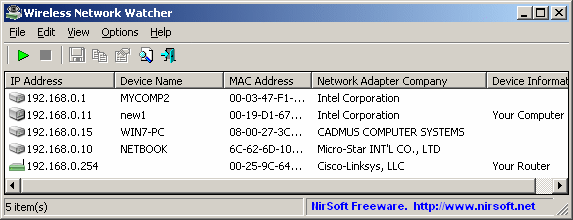
Wireless Network Watcher - Who's on my network?

Have you ever suspected that your Wi-Fi has been hacked and someone is eating up your precious bandwidth? Tracking down the culprit in person may be difficult and awkward, but simply banning them using Wireless Network Watcher is a piece of cake. WNW is an actively developed program by NirSoft that was developed with the specific intention of showing information about clients on your Wi-Fi network. You can get it for free from http://www.nirsoft.net/utils/wireless_network_watcher.html. Once you run it you can see a breakdown of all clients on a network. When you find the culprit, you can copy the IP address and put it on your router's blacklist (see the instruction manual that came with your router for more details). While being a relatively simple program, it has powerful capabilities to look up detailed information about other users on a network. This is also a great program to add to your emergency tech toolkit. If you download the .zip instead of the .exe, you can extract the program to a flash drive, so it's ready to go when your network goes out.

Hey blog readers! If you want to follow our meaningless updates, check out our pages here:
Facebook: http://on.fb.me/U9s2Ld
Twitter: Follow us @allstuffnerdy
Google+: https://www.google.com/+AllstuffnerdyBlogspot
If you have a business you would like us to mention at the beginning of a post, check out our gigs on Fiverr:
Joshua: http://fiverr.com/armmaster17
Brandon: http://fiverr.com/maltzy
Spreadshirt: http://allstuffnerdy.spreadshirt.com
Check out our SpreadShirt shop for our awesome selection of geeky apparel. We offer Mens, Womens, and kid sizes of T-shirts, Long-sleeve shirts, and hoodies in addition to coffee mugs and more. Check out our store here: http://allstuffnerdy.spreadshirt.com

Tuesday, June 03, 2014

WWDC14 - Apple Developer Confrence 2014 - What you need to know.

Apple just had its yearly conference yesterday to show off all of their fancy new gadgets they will be releasing in the next few months. Here are the highlights from the keynote:

iOS 8

iOS 8 will bring some new features to the field. Apple has been listening closely to owners of Androids and jailbroken iPhones to find what their consumers really want. The first major one was the addition of widgets in the notification center. They also announced that you can buy apps in bundles for discounts from participating app developers. Speaking of apps, Apple also gave some interesting updates for developers. Apps can now communicate with each other and can also be programmed in Apple's new programming language Swift. Apple also mentioned that developers can create their own keyboards for iDevices. Great, now we are going to have a billion "swipe" keyboards infesting the app store. And for anyone who has used the Family Sharing feature of Valve's Steam will be pleased to know that Apple will be rolling out a similar function for iTunes purchases.

OS X "Yosemite"

Besides having a complete GUI overhaul, Apple has pushed OS X and iOS to make the transition between the two seamlessly. Now with OS X Yosemite and iOS 8, both your iMac and your iPhone can handle SMS and phone calls so that you aren't constantly juggling multiple devices. They also announced iCloud Drive. Which just seems to be a rip-off of Google Drive. Just like OS X Mavericks, Yosemite will be available as a free download from the app store on supported devices.

iOS HealthKit

Apple announced HealthKit as a default app included with iOS 8. The app again is just a rip-off of Nike+ and a lot of other fitness apps on the app store. It lets you track exercising and other health data in one place. It also takes advantage of the new M7 chip in the latest generation of iPhones (in english, that means it can track your movements more accurately while draining your battery faster). Apple didn't mention any other Apple product tie-ins, but many rumors are spreading on the internet that this is preparing everyone for the iWatch that Apple is supposedly working on.

And that's just about it. Everything else was just filler sentences to add to the suspense. If you want to watch the confrence for yourself, check it out at http://www.apple.com/apple-events/june-2014/. Now that it's all said and done, let's start the countdown for WWDC15. See you next year!

Hey blog readers! If you want to follow our meaningless updates, check out our pages here:
Facebook: http://on.fb.me/U9s2Ld
Twitter: Follow us @allstuffnerdy
Google+: https://www.google.com/+AllstuffnerdyBlogspot
If you have a business you would like us to mention at the beginning of a post, check out our gigs on Fiverr:
Joshua: http://fiverr.com/armmaster17
Brandon: http://fiverr.com/maltzy
Spreadshirt: http://allstuffnerdy.spreadshirt.com
Check out our SpreadShirt shop for our awesome selection of geeky apparel. We offer Mens, Womens, and kid sizes of T-shirts, Long-sleeve shirts, and hoodies in addition to coffee mugs and more. Check out our store here: http://allstuffnerdy.spreadshirt.com

Sunday, May 26, 2013

A virtual museum

Hello blog readers! Sorry I missed geek pride day yesterday, my router isn't the best for 100% uptime. I just thought I would share with you a really neat website: www.winworldpc.com. This website is an online museum with all sorts of stuff like windows 0.1-windows ME ISOs. They have beta ISOs for vista and xp. They also have some Mac OSs but I haven't had a chance to try them out yet. They also have old software and a link to a really good game website (coreduo.me.uk, thanks Cooltile for the reminder!). The game website has the best classics you could find like flight sim 98, or sim copter. Have Fun!

Be sure to like, comment, +1, tweet, or whatever you want to use to share this post. And be sure to click on "suggest an article" above. It takes 5 minutes and really helps me out. And remember that ANYONE can comment below. No sign-in required. Have Fun!

One more thing. I'm currently working on something I'm going to call project Chicago (you old-school windows fans might recognize this name). I'm planning to release it by the end of the summer. Stay tuned as I am going to be needing help and will post here when the need arises. Have Fun!