Showing posts with label Wi-Fi. Show all posts

Wednesday, June 04, 2014

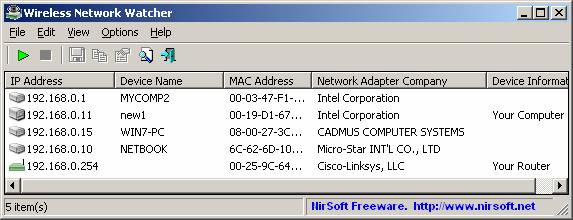
Wireless Network Watcher - Who's on my network?

Have you ever suspected that your Wi-Fi has been hacked and someone is eating up your precious bandwidth? Tracking down the culprit in person may be difficult and awkward, but simply banning them using Wireless Network Watcher is a piece of cake. WNW is an actively developed program by NirSoft that was developed with the specific intention of showing information about clients on your Wi-Fi network. You can get it for free from http://www.nirsoft.net/utils/wireless_network_watcher.html. Once you run it you can see a breakdown of all clients on a network. When you find the culprit, you can copy the IP address and put it on your router's blacklist (see the instruction manual that came with your router for more details). While being a relatively simple program, it has powerful capabilities to look up detailed information about other users on a network. This is also a great program to add to your emergency tech toolkit. If you download the .zip instead of the .exe, you can extract the program to a flash drive, so it's ready to go when your network goes out.

Hey blog readers! If you want to follow our meaningless updates, check out our pages here:
Facebook: http://on.fb.me/U9s2Ld
Twitter: Follow us @allstuffnerdy
Google+: https://www.google.com/+AllstuffnerdyBlogspot
If you have a business you would like us to mention at the beginning of a post, check out our gigs on Fiverr:
Joshua: http://fiverr.com/armmaster17
Brandon: http://fiverr.com/maltzy
Spreadshirt: http://allstuffnerdy.spreadshirt.com
Check out our SpreadShirt shop for our awesome selection of geeky apparel. We offer Mens, Womens, and kid sizes of T-shirts, Long-sleeve shirts, and hoodies in addition to coffee mugs and more. Check out our store here: http://allstuffnerdy.spreadshirt.com

Monday, May 12, 2014

Life of Sudo – Day 001 – 16 colors is better than none

Hello blog readers! This is a blog of all my crazy tech adventures. I am constantly making unnecessary upgrades to ancient hardware and usually spending lots of time trying to fix them. If you have something crazy you want me to try on one of my old computers (as long as it doesn't break it!), feel free to drop a comment below.

Hey blog readers! we have a new Facebook page! Check it out at http://on.fb.me/U9s2Ld

They said it couldn't be done, and they were right. You cannot run Windows 8.1 on a Pentium III. So, I went with the next best thing, Windows 7! I finally got it to install on a 833 MHz PIII with 512 MB of RAM. I was surprised when it booted up in under 2 minutes. Not bad. Then I saw the login screen and just about had a heart attack. For some reason, Windows 7 didn't like the integrated Intel 810e graphics card, so it just decided to default to 16 color (read color, not bit) at 800 x 600 resolution. After going through the setup (and obviously skipping the activation, ‘cause nobody got time for that), I fired up IE8. Then I found out that I wasn't connected to the internet. Turns out that Windows couldn't get the driver for my Ethernet card. Problem was that it had to go online to get the driver for the card so it could connect to the internet. Stupid Windows. I stuck a Wi-Fi stick into the PC and got it online. Then the computer locked up. Should have known, Windows was trying to install about 183 updates. After letting it run all day, it finally restarted. Then I tried to go back to the problem with the graphics. I fired up IE8 again. Trying to expose myself to IE as little as possible, I immediately installed Firefox since Chrome is a little bit of a resource hog. After searching the Intel driver database, I found out that they just deleted the entire 810 driver database after Windows Vista was released because of the new WDDM driver framework. So much for that. I'll try Linux on one of my other computers tomorrow.


Hello blog readers! Be sure to drop a comment below to see if I should continue this series on my blog. And if you want me to do something crazy with one of my old computers, be sure to drop a comment below. Don’t forget to like, +1, and share this article! If you have a tech company or product that you want me to review or mention here on this blog, visit http://www.fiverr.com/armmaster17. Have Fun!